Music that steps aside when you talk.
Your microphone, system sound, music and narration each get a track and a fader. Music ducks under the voice by itself, and a narrator can be generated from a script when you would rather not record one.
macOS 15.2+ • free to try • pay once from $49
Separate tracks
Mic, system audio, music and voice each have waveforms, mute, volume and a fader, plus a master.
Duck music under voice
Turn on Duck Music and the music lowers whenever someone speaks, then comes back.
Volume regions
Duck, boost or silence a range of any track, with fades in and out.
Record a voice-over
Record narration at the playhead with your choice of microphone and a countdown.
AI narration
Generate speech from a script with Kokoro or PocketTTS voices that run on your Mac, or ElevenLabs with your own key.
Beat markers
Analyze Beats on a music clip shows its beats on the timeline, so cuts and camera moves can land on them.
How it works
- 01
Add music and voice
Drop a music file on the timeline, record a voice-over at the playhead, or click Create AI narration and type a script.
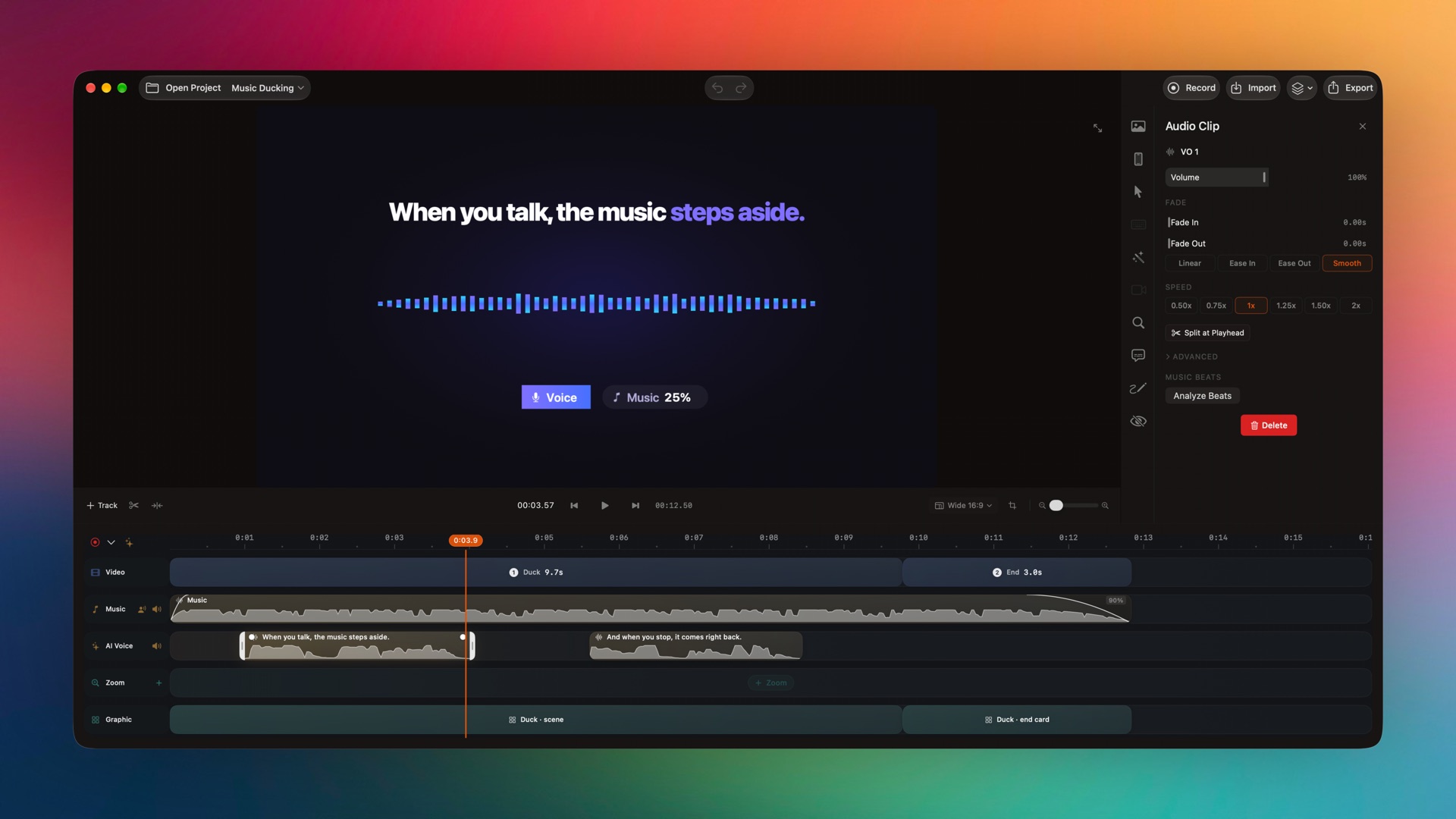
Captured from the editor with smoothcapture cli screenshot --pretty. - 02
Balance the mix
Use each lane’s fader and per-clip volume, add volume regions, and turn on Duck Music on the music clip.
Or ask your agent to do it.
Agents can list voices, generate narration into the project and read its exact duration back to time the edit.
Set up MCP and the CLIsmoothcapture cli editor narration-voices --json
smoothcapture cli editor generate-narration --input - <<'JSON'
{"text": "When you talk, the music steps aside.",
"voice": "kokoroHeart", "startTime": 0.5, "revision": "…"}
JSONCommon questions.
Can I add background music?
Yes. Drop any music file onto the timeline. Set its volume, fade it in and out, and turn on Duck Music so it lowers under speech.
Can SmoothCapture generate a voice-over from text?
Yes. Kokoro and PocketTTS voices download once and then run offline on your Mac. You can also connect your own ElevenLabs key, which is stored in your Keychain.
Are mic and system audio recorded separately?
Yes. They are separate tracks with their own volume and mute, so a loud notification or a quiet mic can be fixed after recording.
Does SmoothCapture remove background noise?
Not currently. Use a volume region to silence or duck a noisy stretch, or clean the audio in another app and import it.
Can I cut to the beat of the music?
Yes. Analyze Beats shows beat markers on the timeline, and blocks snap to them as you drag.
Works well with
Try it on your own recording.
Record and edit for free. A licence unlocks export.
