Export the file you need, or just share a link.
Save an MP4 for the web, a transparent ProRes file for your site or editor, or a GIF for a README. Export renders through the same GPU pipeline as the preview, so what you see is what you get.
macOS 15.2+ • free to try • pay once from $49
MP4, ProRes and GIF
MP4 with H.264 or HEVC, ProRes 422, transparent ProRes 4444, and animated GIF.
Up to 4K at 60 fps
Original, 720p, 1080p, 1440p or 4K, at 24, 30 or 60 frames per second.
Transparent background
Turn on Transparent background to export ProRes 4444 with alpha for websites, slides and motion design.
App Store sizes
Presets for iPhone 886×1920, 1080×1920 and iPad 1200×1600, in portrait and landscape.
Quality presets
Studio, Social Media, Web and Web (Low) trade file size against quality.
Save, share or publish
Save a file, share a link that copies to your clipboard, or publish to your own R2 or S3 bucket.
How it works
- 01
Open Export
Click Export in the toolbar. Pick the format, resolution, codec, quality and frame rate.
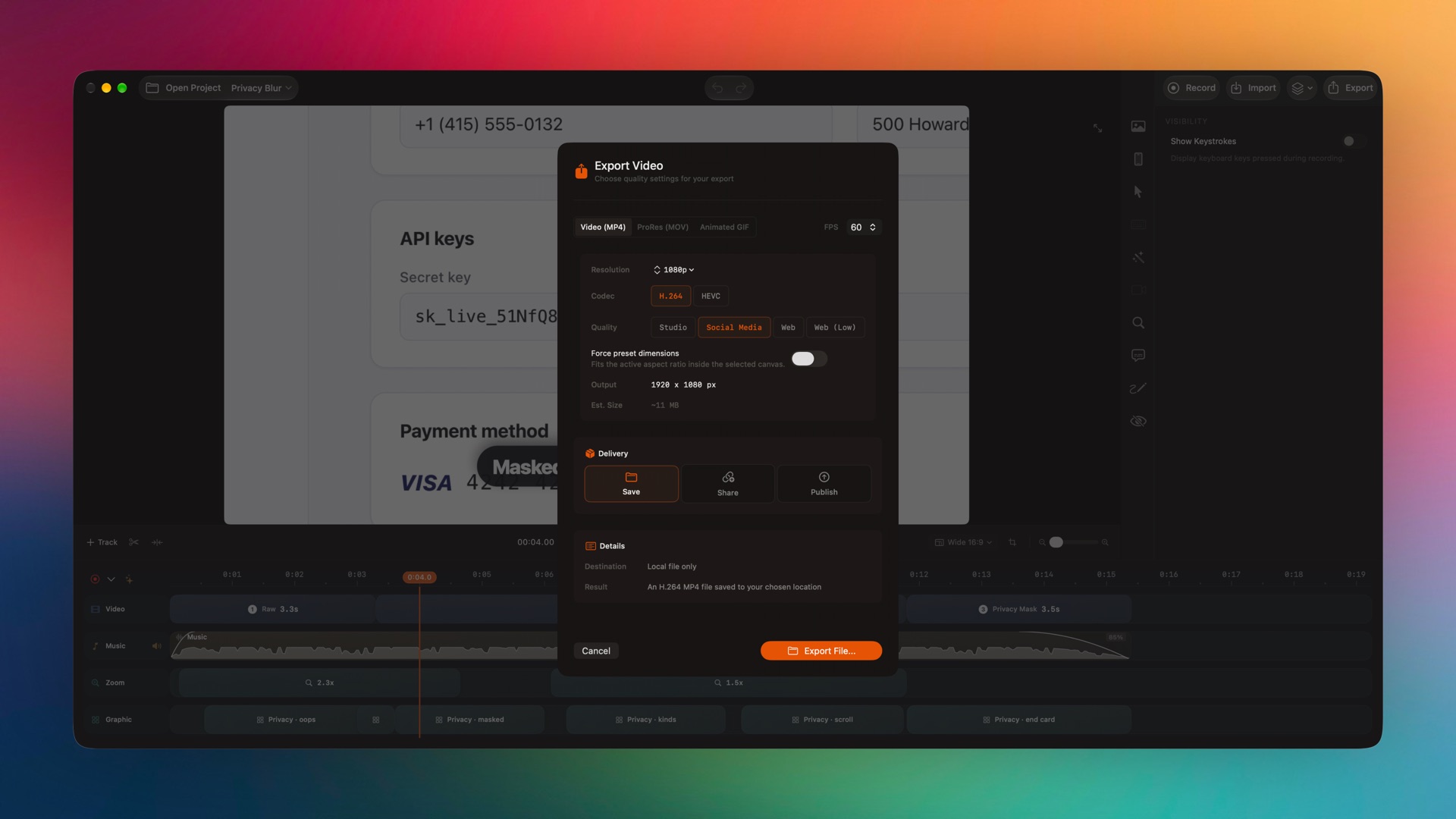
Captured from the editor with smoothcapture cli screenshot --pretty. - 02
Export a GIF or a transparent video
Choose Animated GIF and set its size, length and palette, or choose ProRes (MOV) with Transparent background.
- 03
Share a link instead
Choose Share under Delivery. The video uploads and a link with a thumbnail is copied, ready to paste.
Or ask your agent to do it.
Export headlessly through the same Metal pipeline as the app, with presets or exact overrides that are only in the CLI.
Set up MCP and the CLIsmoothcapture cli export --path demo.smoothcapture \
--output demo.mp4 --preset 4K60
smoothcapture cli export --path demo.smoothcapture \
--output hero.mov --codec proRes4444 --transparentCommon questions.
Can I export with a transparent background?
Yes. Choose ProRes (MOV) and turn on Transparent background to export ProRes 4444 with alpha. On Macs without the ProRes encoder it falls back to HEVC with alpha.
Can I export a GIF?
Yes. Choose Animated GIF and set the maximum size from 480p to 1440p, the maximum length, the frame rate and the palette.
Does SmoothCapture export 4K at 60 fps?
Yes. Pick 4K and 60 fps in the export sheet, or use the 4K60 preset from the CLI.
How long do share links last?
Share links stay up for 30 days. Files you save to your Mac are not affected.
Do I need a licence to export?
Yes. Recording and editing are free. Exporting from the app and publishing share links need a licence. Exports from the CLI or an agent without one carry a watermark.
See pricingCan I copy a single frame?
Yes. Frame → Copy Current Frame (⇧⌘C) copies it to the clipboard, and you can copy or save it with a transparent background too.
Try it on your own recording.
Record and edit for free. A licence unlocks export.
