Video Delivery Networks: A Guide for Flawless Playback
You exported a sharp product demo. The cursor movement is clean, the voiceover is on point, and the opening frame looks polished enough for a launch page, sales deck, and onboarding flow. Then the complaints start. The video takes too long to load on mobile. A customer in another region sees buffering before the first feature reveal. Someone on a weaker connection gets a blurry start and gives up before the payoff.
That failure usually isn’t a creation problem. It’s a delivery problem.
Teams spend a lot of time on capture, editing, framing, subtitles, and bitrate decisions. Those choices matter. Resources like Cloud Present’s video data guide help teams think more clearly about file size, resolution, and data rate, and a streaming bitrate calculator can help you prepare files sensibly before upload. But after export, a different system takes over. If that system is weak, even a well-made video feels broken.
Table of Contents
- Why Your Polished Video Still Buffers
- VDN vs CDN vs Streaming Platform Explained
- The Architecture of Instant Video Playback
- Understanding HLS DASH and Low Latency
- How to Choose the Right Video Delivery Network
- Implementation Checklist for SmoothCapture Videos
- From Creation to Conversion Your Next Step
Why Your Polished Video Still Buffers
A polished video can still fail in the first few seconds. That’s where viewers decide whether your company feels professional or frustrating.

Organizations often first notice the problem in familiar places. A homepage hero video stutters on mobile. A sales demo embedded in a landing page loads quickly in the office but drags for buyers abroad. A training library works fine at low traffic, then struggles when a new rollout sends everyone to the same content at once.
The common thread is simple. Your video file exists, but it isn’t being delivered in a way that matches how people watch.
Playback quality is an infrastructure issue
A video delivery network is the part of the stack built to handle that gap. It stores and serves video through a distributed delivery layer that puts content closer to the viewer and adapts playback to real network conditions. That matters because video isn’t like serving a logo, a PDF, or a landing page screenshot. It has to start fast, stay stable, and recover gracefully when bandwidth changes mid-session.
Practical rule: If a video is important enough to affect conversion, activation, support load, or training completion, it’s important enough to deserve specialized delivery.
This isn’t a niche concern anymore. The global CDN market, which underpins video delivery networks, was valued at USD 26.16 billion in 2025 and is projected to reach USD 74.25 billion by 2034 at a 12.29% CAGR, according to Global Market Insights on the CDN market. Product teams don’t need that number to know buffering is bad. They do need it to understand that reliable delivery has become core infrastructure, not an optional optimization.
What buffering really costs
When playback breaks, the damage spreads beyond viewer annoyance:
- Launch videos lose impact: The opening seconds carry the product promise. Slow starts waste the highest-intent moment.
- Training content becomes harder to finish: Employees and customers tolerate friction once. They won’t tolerate it repeatedly.
- Brand trust erodes: Viewers don’t separate the video system from the product. They blame your company.
Teams usually improve creation quality before they improve delivery quality. That’s backwards when the viewing experience is the first thing the audience feels. A strong edit gets attention. A strong delivery system keeps it.
VDN vs CDN vs Streaming Platform Explained
People often use these terms interchangeably. That causes bad buying decisions.
A general CDN moves many kinds of content closer to users. A streaming platform bundles hosting, playback, and often publishing workflows. A video delivery network focuses on the performance demands of video itself, including segmented delivery, adaptive playback, caching behavior, and video-specific observability.
Three tools that solve different problems
The easiest way to think about it is logistics.
A general CDN is a strong courier network for many package types. It can move images, scripts, documents, app assets, and video files. For many websites, that’s enough.
A streaming platform is closer to a TV station or managed video service. You upload content, it handles hosting, player delivery, and often access control or publishing workflows. That works well when convenience matters more than deep control.
A video delivery network is a specialist. It isn’t just carrying files. It’s helping the player request the right video segments, at the right quality, from the right edge location, under changing network conditions. That’s why teams with product demos, training libraries, launch events, or paid media landing pages often outgrow a generic setup.
Delivery options at a glance
| Capability | Video Delivery Network (VDN) | General CDN | Streaming Platform |
|---|---|---|---|
| Primary job | Optimize video playback quality at scale | Accelerate many asset types | Provide end-to-end hosted video workflows |
| Best for | Product video, training, OTT, high-stakes embedded playback | Websites, apps, static and dynamic assets | Teams that want simplicity over control |
| Video segmentation support | Strong focus | Sometimes present, often less specialized | Usually abstracted away from the user |
| Adaptive bitrate workflows | Built around them | May support related delivery patterns but isn’t video-first | Usually included behind the scenes |
| Player flexibility | Often high | Depends on your stack | Often tied to platform tooling |
| Analytics depth | Usually better for QoE and playback troubleshooting | Better for network delivery than viewer-level playback insight | Good for business reporting, varies on technical depth |
| Monetization and publishing tools | Limited or external | Limited | Often built in |
| Operational control | High | Medium | Lower |
| Ease of setup | Medium | Medium | High |
Which one fits your team
A product marketing team embedding demos across a website usually needs more than file acceleration. It needs reliable startup, graceful quality shifts, and clear playback analytics. That’s VDN territory.
A startup that just wants to upload webinars and gate them behind a simple player may be happier with a streaming platform.
A company serving mostly static web assets, with only occasional downloadable video, can often stay with a general CDN longer.
Don’t buy based on the label. Buy based on whether the video is a side asset, a publishing workflow, or a conversion-critical experience.
That distinction saves time in vendor calls because it changes the questions you ask. Instead of asking whether a provider “supports video,” ask whether video is central to the product architecture.
The Architecture of Instant Video Playback
A good delivery setup feels simple to the viewer because the complexity sits upstream.
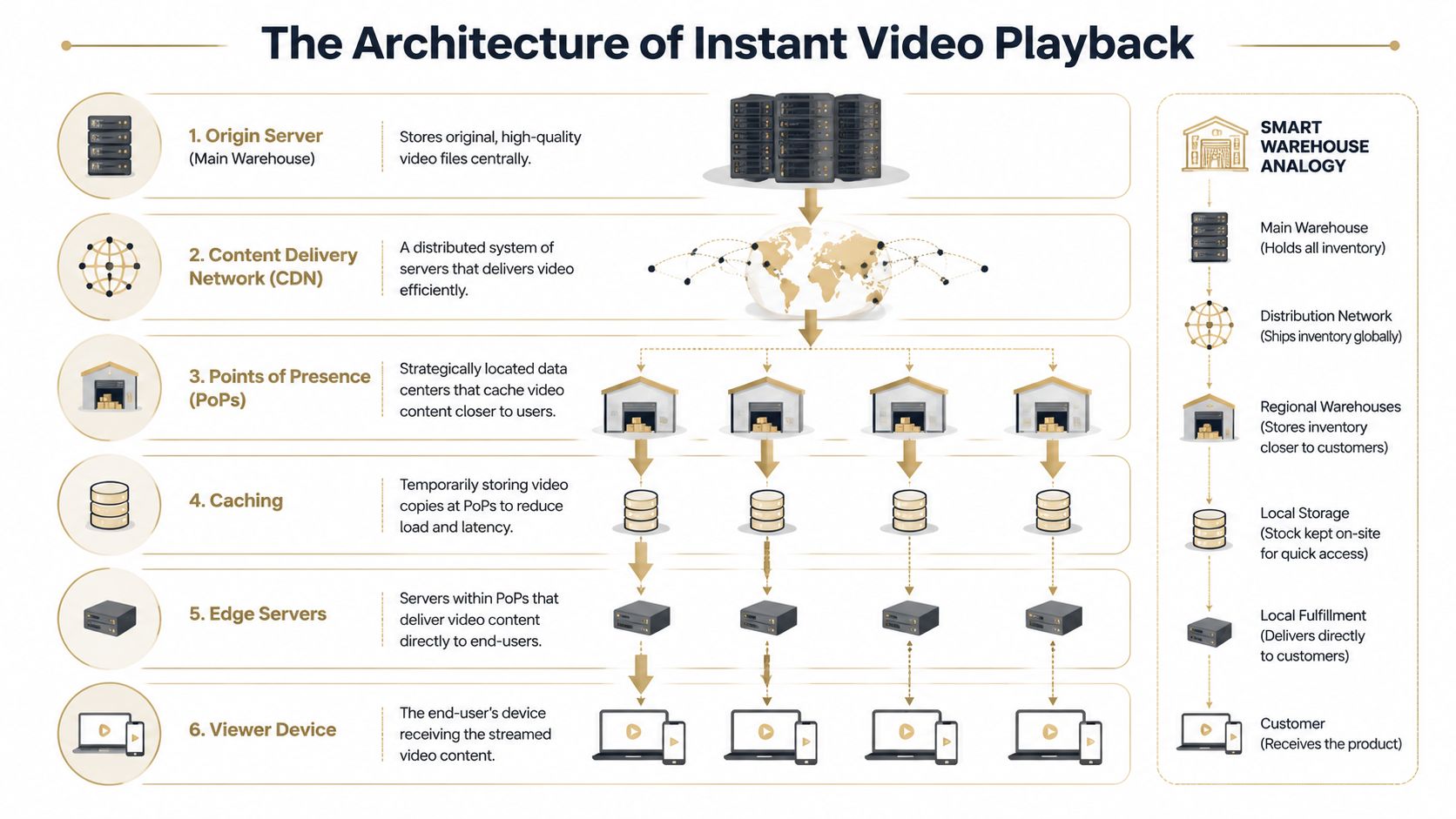
Think in warehouses not files
The cleanest mental model is a network of smart warehouses.
Your origin server is the main warehouse. It stores the source video and the prepared renditions. The CDN layer is the distribution system. Its Points of Presence, or PoPs, are regional warehouse sites. Inside those PoPs, edge servers keep copies of the video segments most likely to be requested.
The viewer’s device doesn’t usually need to go back to the main warehouse for every chunk of playback. It pulls nearby copies from the edge. That reduces travel distance for the data and lowers the chance that one central system becomes a bottleneck.
A short explainer helps if you want a visual walkthrough:
Why proximity changes playback
Distance affects video more than teams expect. When content comes from edge servers instead of a distant origin, a VDN can reduce latency by up to 75%, and Akamai notes that edge proximity can absorb 90 to 95% of requests during traffic spikes while reducing buffering time by an average of 2.5 seconds per session in its explanation of how CDNs reduce latency and offload origin traffic.
That has two direct effects.
First, startup feels faster because the first chunks arrive sooner. Second, your origin stays healthier during traffic spikes because the edge handles most of the repeat demand. That’s especially important for launch campaigns, all-hands training, or public announcements where many viewers hit the same asset in a short window.
What product teams should care about
You don’t need to manage PoPs yourself. You do need to understand how the architecture changes outcomes.
- Edge caching protects big moments: A launch video promoted across email, paid social, and your homepage shouldn’t hammer the origin each time a viewer presses play.
- Segmented caching helps repeat viewing patterns: Tutorials, feature demos, and onboarding clips often get rewatched in bursts by region or team.
- Request routing affects real users: The viewer in one market shouldn’t wait on a transcontinental trip for a file that could be served nearby.
The most useful question isn’t “Do we have a CDN?” It’s “Are viewers receiving the video from the nearest healthy cache with the right playback variants ready?”
That’s where instant playback starts. Not in the editor. In the delivery path.
Understanding HLS DASH and Low Latency
Video delivery networks depend on a simple idea. Don’t force every viewer to watch the same file in the same way.
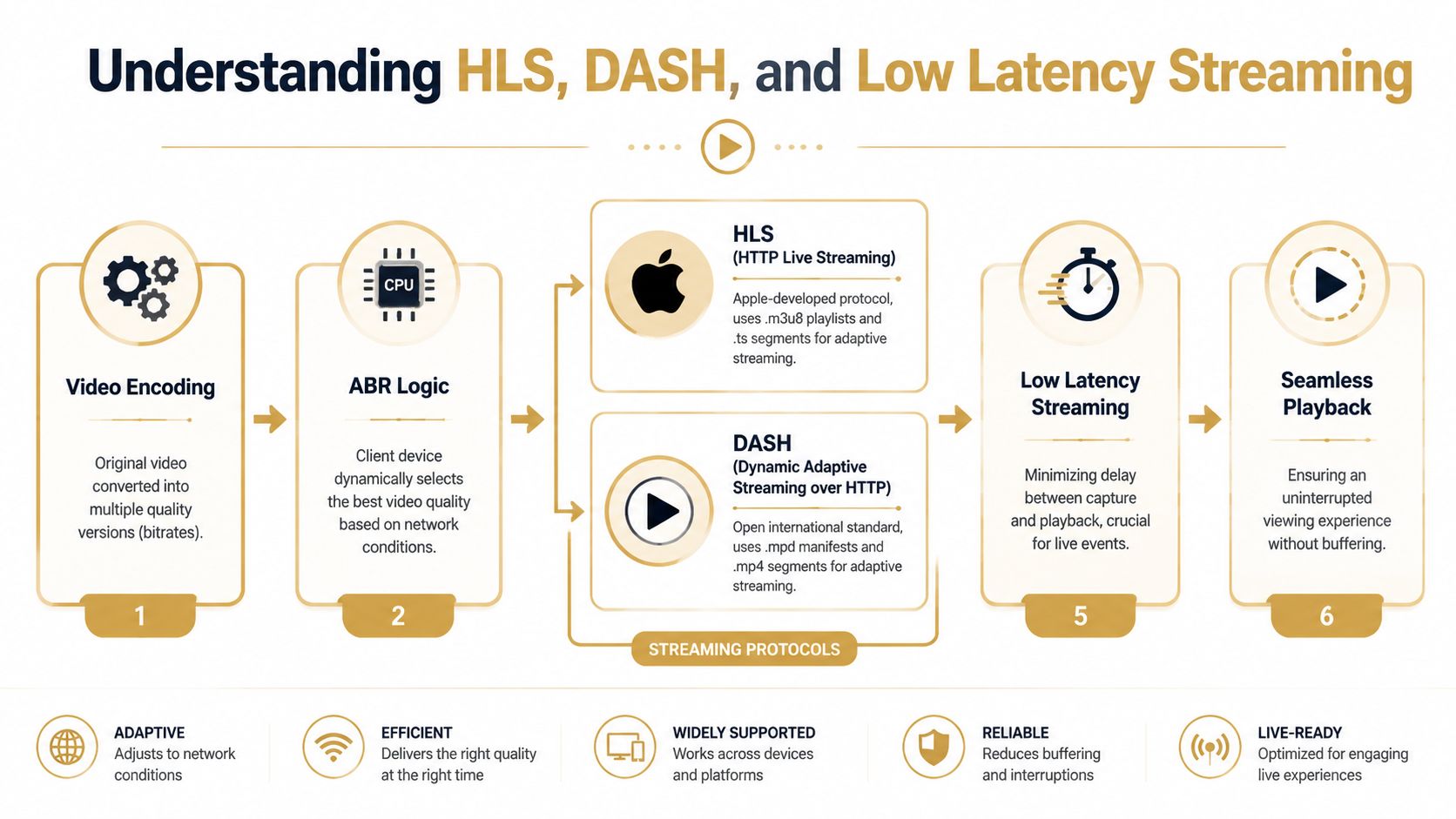
ABR is what saves playback
Adaptive Bitrate Streaming, usually shortened to ABR, is the system that makes modern playback resilient. Instead of delivering one fixed file, the video is encoded into multiple quality levels. The player monitors bandwidth and device conditions, then asks for the version it can sustain.
If the connection weakens, the player drops to a lighter rendition before the viewer hits a stall. If the connection improves, it steps back up. That trade is usually invisible when it’s done well.
ABR is more than a convenience feature. It reduces adaptive latency by 30 to 50% compared with static bitrate delivery and directly correlates to a 15% increase in viewer retention rates on mobile networks, based on the verified data provided for this article. That is why fixed-bitrate thinking tends to fail on real audiences, especially across mixed mobile and broadband traffic.
HLS and DASH in practical terms
The two main ABR delivery formats are HLS and DASH.
HLS is widely supported and especially familiar in Apple-heavy environments. DASH is an open standard and is common in broader cross-platform workflows. For most product and marketing teams, the practical difference isn’t the protocol politics. It’s device reach, player support, and how your vendor packages and serves the stream.
A simple rule works well:
- Use HLS when compatibility is the main concern: It’s a safe default for broad device support.
- Use DASH when your stack benefits from open-standard flexibility: Many enterprise and custom-player setups like this route.
- Use both when the provider handles packaging well: That’s common in mature video stacks.
If you’re refining your understanding of network delay at the application level, Capgo on network latency management is a useful companion read.
When low latency actually matters
Not every video needs low-latency delivery. An on-demand onboarding video usually doesn’t need the viewer to be near the live edge. A product reveal with live Q&A does. So does interactive training, live demos, or any format where the gap between presenter and audience affects the experience.
Use standard adaptive streaming for most on-demand libraries. Pay for low-latency delivery when the timing itself is part of the product experience.
The mistake teams make is treating low latency as a prestige feature. It isn’t. It’s a business requirement for specific formats and unnecessary complexity for others. The best delivery setup matches the content type, not the hype cycle.
How to Choose the Right Video Delivery Network
Buying a VDN is partly a technical decision and mostly a product decision. The wrong provider usually doesn’t fail in the sales process. It fails later, when marketing launches globally, support publishes a large training library, or a live event exposes weak routing and poor observability.
Start with the user experience you need
Begin with the playback experience, not the feature list.
A homepage explainer needs fast first frame and stable playback on mobile. A training library needs consistency across many sessions, reasonable access control, and analytics that show where viewers drop. A launch event needs resilience under traffic spikes. Those aren’t the same purchase.
When teams skip this step, they compare vendor brochures instead of delivery outcomes.
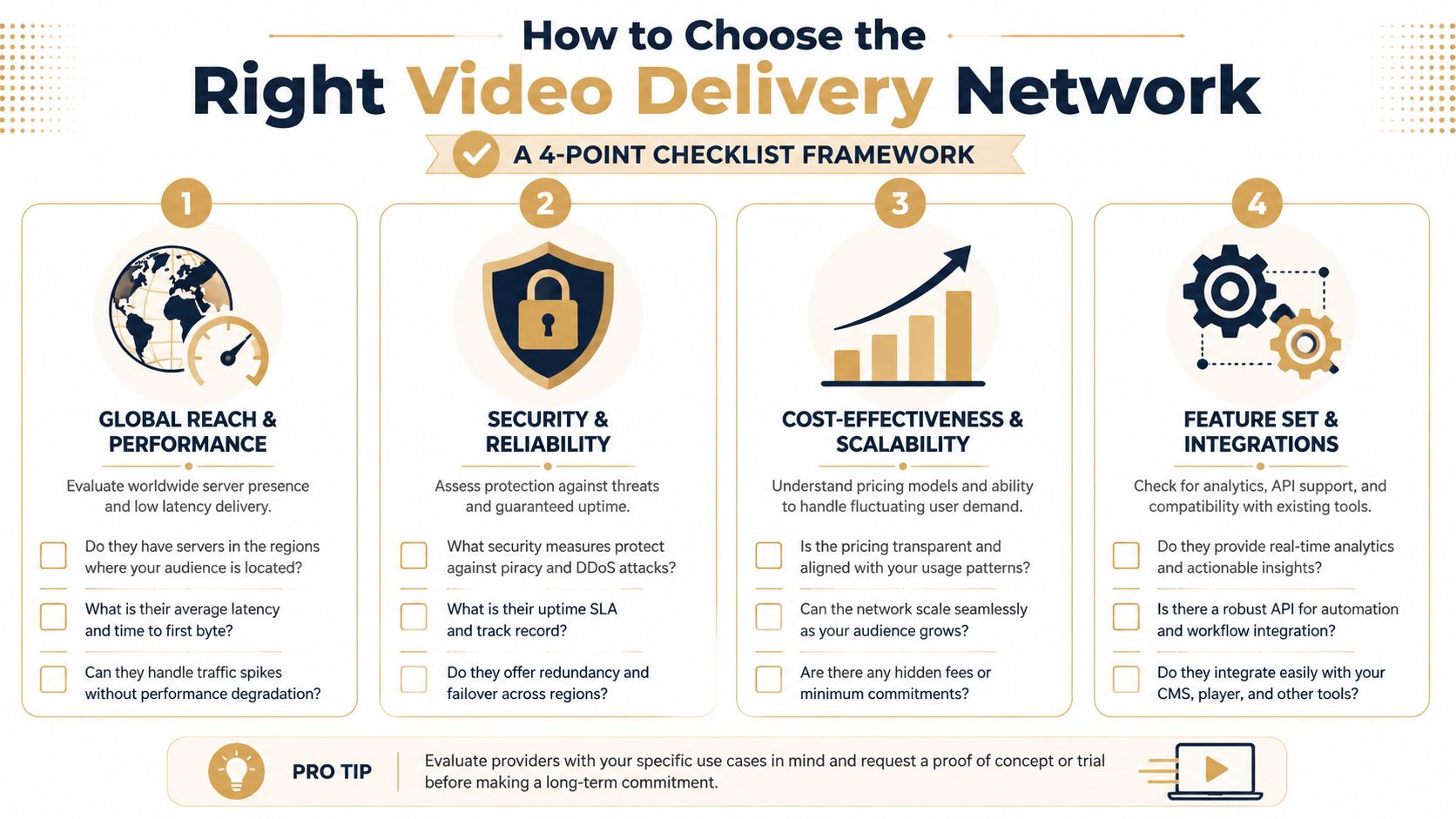
The four checks that matter most
Use four lenses when evaluating providers.
-
Performance and reach
Ask where the provider has strong edge presence for your audience and how it handles startup time, buffering, and traffic spikes. If your viewers are clustered in a few regions, test there first. If your campaigns are global, weak regional coverage will show up quickly in playback complaints. -
Security and access control
Product videos aren’t always public. Training, paid content, partner demos, and pre-release launch assets often need tokenized access, geoblocking, signed URLs, or DRM. Security shouldn’t be bolted on after distribution begins. -
Analytics and debugging
You need more than view counts. Ask what the provider shows for startup failures, playback errors, bitrate switching, abandonment, and device-level quality patterns. If support tickets come in, can your team tell whether the problem was the player, the asset, the geography, or the network path? -
Pricing and operational fit
Cheap transfer pricing can hide expensive complexity elsewhere. Look at how billing behaves when usage spikes, whether storage and transcoding are separate, and whether the platform makes simple tasks difficult. A lower unit cost with poor observability often turns into a higher total cost.
Single provider or multi CDN
In this area, teams often overengineer.
A single-provider setup is easier to operate. Fewer dashboards, fewer routing rules, fewer edge cases in troubleshooting. For many product video libraries and standard embedded playback, that’s the right choice.
A multi-CDN strategy can improve availability, and AWS notes that teams often pursue it to improve resilience and performance selection across providers in its guide to using multiple CDNs for video streaming. The same trade-off matters in edge-heavy designs. Edge computing can cut latency by up to 30%, but both multi-CDN and edge strategies add operational complexity, so the right answer depends on whether you’re optimizing for peak-event reliability or everyday simplicity.
That last phrase matters. Not every team needs the most advanced architecture. They need the architecture they can operate well.
Buying advice: Choose the simplest setup that reliably supports your worst important day, not your most hypothetical one.
If your calendar includes major launches, paid campaigns, or live customer events, test failover and regional playback before signing. If your use case is steady-state on-demand content, operational simplicity may be worth more than architectural ambition.
Implementation Checklist for SmoothCapture Videos
Once the edit is done, the fastest path to broken playback is rushing the delivery setup. Treat export, upload, transcoding, player configuration, and analytics as one workflow.
Prepare the master file correctly
Start with a clean master export. Use a modern codec your delivery provider accepts well, keep audio clean, and avoid baking your final distribution assumptions into one rigid file. The master is source material for transcoding, not the stream itself.
If your recording includes narrated walkthroughs or interface actions, fix timing issues before upload. Delivery networks can adapt bitrate. They can’t repair sloppy sync. A practical reference for that stage is this guide on how to sync audio with video.
Move through the delivery setup in order
A reliable workflow usually looks like this:
- Export a high-quality master: Keep the source strong enough for downstream renditions.
- Upload to the chosen VDN or video platform: Let the service generate adaptive outputs instead of hand-making too many separate files.
- Confirm rendition logic: Make sure the provider creates the range of qualities your audience needs for desktop and mobile playback.
- Embed the player where the video will play: Landing page behavior matters more than isolated preview behavior.
- Test across real conditions: Check mobile networks, office Wi-Fi, home broadband, and key geographies if your audience is distributed.
- Connect analytics before launch: If playback degrades, you want evidence immediately, not guesses after complaints arrive.
Keep efficiency in the decision loop
Performance isn’t the only optimization target anymore. Cost and infrastructure efficiency matter too. Research highlighted in the verified data for this article notes that edge-based processing can reduce startup time by 20 to 40% and rebuffering by 30 to 50%, while also raising questions about the infrastructure and energy cost of moving more logic to the edge, discussed in the White Rose research paper on future video network optimization.
That means teams should avoid two extremes. One is underinvesting and shipping videos that stall. The other is building an overly complex edge-heavy setup for a modest content library that doesn’t justify it.
A practical implementation checklist for teams:
- Match delivery to audience size: A small internal library doesn’t need the same architecture as a public launch campaign.
- Match latency to format: On-demand tutorials and live events shouldn’t inherit the same configuration by default.
- Match analytics to ownership: Marketing, support, and education teams need different signals from the same playback data.
- Match complexity to capacity: If nobody can operate the stack confidently, the stack is too complex.
Good delivery isn’t the fanciest setup. It’s the setup your team can repeat without surprises.
From Creation to Conversion Your Next Step
A polished edit gets a viewer interested. Delivery determines whether that interest survives the first click.
That’s the practical case for video delivery networks. They turn playback from a fragile afterthought into a dependable part of the product experience. That matters whether you’re publishing launch assets, onboarding libraries, support walkthroughs, or product demos that need to perform in the wild, not just in review.
Teams that publish regularly usually benefit from tightening both sides of the workflow. On the content side, it helps to broaden the formats you produce, and this content guide for YouTube creators is useful for thinking through format mix and audience intent. On the delivery side, it helps to make sure your exports are web-friendly and adaptable. If you’re preparing lightweight playback formats, a guide on how to convert to WebM can help round out that part of the process.
The main takeaway is simple. Creating the video is only half the job. Delivering it well protects the time, budget, and credibility already invested in making it.
If your team produces demos, tutorials, launch videos, or walkthroughs every week, SmoothCapture gives you a fast native macOS workflow for recording, editing, framing, subtitling, and exporting polished video without piling on extra tools. Try it to speed up production, then pair that content with a delivery setup that respects the work you’ve already done.
Ready to create stunning app demos?
SmoothCapture makes it easy to record your screen with 3D device frames, cinematic cursor effects, and professional editing tools.