Collaborative Video Editing: A Team Workflow Guide
You probably know the failure pattern already. The editor exports a cut called “final.” A producer forwards it to stakeholders. One person replies in email, another drops notes in chat, a client sends “small tweaks” from a phone while traveling, and somebody downloads the wrong file and starts commenting on yesterday’s version. By the time the team aligns, nobody is fully sure which sequence is current, which feedback is approved, or whether the latest export still has the right linked media.
That’s why collaborative video editing goes sideways so easily. Video projects combine large media, specialized roles, subjective decisions, and approval chains that rarely stay tidy. The software matters, but the primary failure point is usually the handoff between people. Editors hand off to producers. Producers hand off to reviewers. Reviewers hand off contradictory notes. Then the team tries to preserve a single source of truth while moving between desktop, mobile, and remote environments.
The good news is that this isn’t random chaos. It’s an operations problem. With the right rules for roles, files, versions, and reviews, collaborative video editing becomes predictable enough to run repeatedly without drama.
Table of Contents
- The High Cost of Disorganized Video Collaboration
- Build Your Foundation Roles Files and Versions
- Choose Your Model Real-Time vs Asynchronous
- The Modern Collaborative Video Tool Stack
- Mastering the Review and Approval Loop
- Your Collaborative Workflow Checklist
The High Cost of Disorganized Video Collaboration
A messy video project rarely fails in one dramatic moment. It usually slips. The first slip is small: a reviewer comments on a downloaded file instead of the current review link. The second is worse: the editor applies notes from a producer who didn’t consolidate client feedback first. Then the team discovers that the “latest” project file opens with missing assets because another collaborator organized media differently.
That kind of disorder burns time in areas that are not usually budgeted. Editors stop editing and start investigating. Producers become translators between stakeholders instead of running the process. Clients lose confidence because each round feels less controlled than the last.
Collaborative video editing is harder than many other team workflows because every handoff has both a technical and a creative risk. The technical risk is version confusion, missing links, duplicate exports, or incorrect media paths. The creative risk is vague feedback like “make it pop,” conflicting opinions on pacing, or approvals that get reopened after the team thought the cut was locked.
Practical rule: Most video collaboration problems don’t start in the timeline. They start in the handoff.
Researchers began treating collaborative video editing as a distinct design problem in the early 2020s, not just a feature inside editing software. In the ACM paper Designing for Collaborative Video Editing, researchers identified core challenges such as preserving editor focus while adding collaborative interfaces, and supporting both co-present and remote collaboration. That lines up with what working teams deal with daily. More collaboration features help only if they don’t create more interruption and confusion.
The fix isn’t “pick better software” and hope for the best. The fix is to run the project with governance. Define who decides. Define where files live. Define how versions move forward. Define how feedback becomes action. Once those rules are in place, the tech starts helping instead of adding another layer of noise.
Build Your Foundation Roles Files and Versions
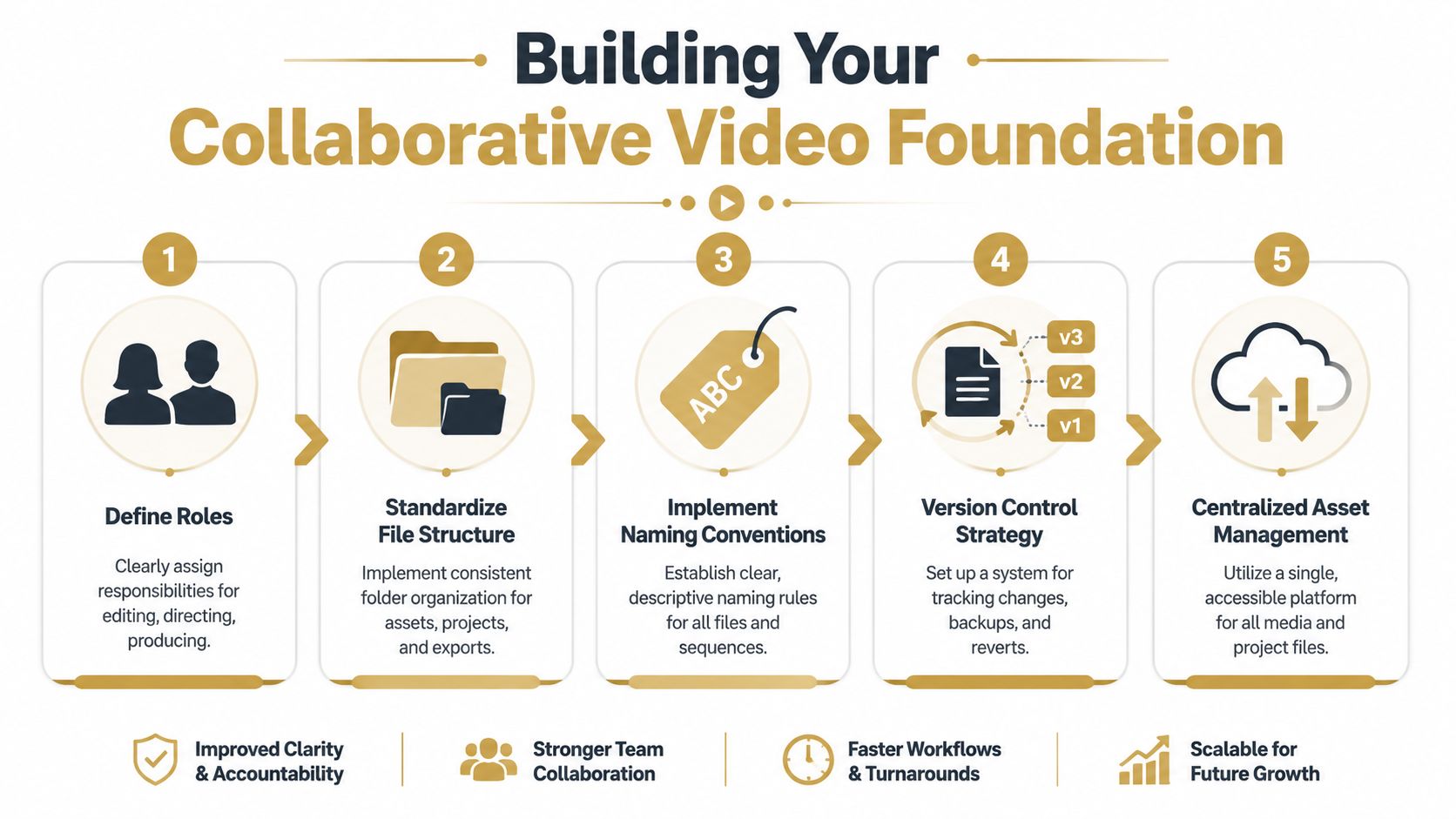
Collaboration is often addressed after footage is already in motion. That’s late. The cleanest projects are organized before ingest, before the first rough cut, and before anyone starts inventing file names on the fly.
A practical workflow is usually organized into seven stages: set up and asset organization, ingest, rough cut, fine cut, finishing, client approvals and revisions, and export and delivery according to LucidLink’s collaborative workflow guide. The reason that matters operationally is simple. If your setup is sloppy, every later stage inherits the mess.
Start with the actual decision makers
Don’t assign broad labels like “marketing team” or “creative.” Assign names to roles.
A basic collaborative video editing project usually needs these three operating roles:
- Producer: Owns timeline, deadlines, review rounds, and final decision routing. The producer should be the only person consolidating stakeholder notes before they reach the editor.
- Editor: Owns sequence structure, technical execution, version creation, and revision implementation. The editor should not have to decode five competing sources of feedback.
- Reviewer: Comments on the cut within their lane. A product marketer may review messaging, a founder may review claims, and a client may review brand alignment. Reviewers should not rewrite each other’s priorities in parallel.
If your project needs motion design, sound, or color, assign those as specialist roles too. The point isn’t bureaucracy. The point is removing ambiguity.
Use a folder structure that survives handoffs
A strong folder structure should make sense to someone joining the project midstream. If a freelancer or producer can’t find the current export in seconds, the structure is failing.
A reliable top-level setup looks like this:
- 01_Admin: Briefs, scripts, shot lists, approvals, release forms
- 02_Raw_Footage: Camera media, screen recordings, phone captures
- 03_Audio: VO, music, SFX, cleaned dialogue
- 04_Graphics: Logos, lower thirds, brand assets, thumbnails
- 05_Project_Files: NLE files, autosaves, shared templates
- 06_Exports: Review cuts, approval cuts, final deliverables
- 07_Archive: Locked versions, old sequences, retired assets
Within those folders, keep naming shallow and predictable. Deep nesting looks neat until someone needs to relink media under deadline.
If your team regularly records software tutorials or product walkthroughs, keep source captures clearly separated from edited assets. That prevents people from accidentally cutting from compressed exports instead of original recordings. If you need cleaner source material for this kind of work, a guide on how to sync audio with video is useful because sync problems tend to multiply once multiple collaborators touch the same sequence.
One shared structure beats ten clever personal systems.
Make version names boring and consistent
Version control fails when people try to be human-readable instead of machine-readable. Names like final, final2, and client-final-really-final are how teams lose half a day.
Use a naming convention that answers four questions: what is it, which cut is it, who made it, and when.
For example:
ProjectName_RoughCut_v01_AB_2026-06-04ProjectName_FineCut_v04_JS_2026-06-06ProjectName_ClientReview_v02_AB_2026-06-08ProjectName_Master_Approved_2026-06-10
A few rules make this stick:
- Never overwrite an approved export. Create a new version every time.
- Keep sequence names aligned with export names. If the timeline says
v07, the review file shouldn’t sayv05. - Reserve “approved” for actual sign-off. Not “looks good so far.”
- Store superseded versions, don’t scatter them. Move them into archive folders so the team can trace decisions if needed.
This foundation feels unglamorous, but it’s what protects creative momentum later. Teams don’t usually lose projects because they lacked opinions. They lose them because nobody could tell which asset, sequence, or note governed the next move.
Choose Your Model Real-Time vs Asynchronous
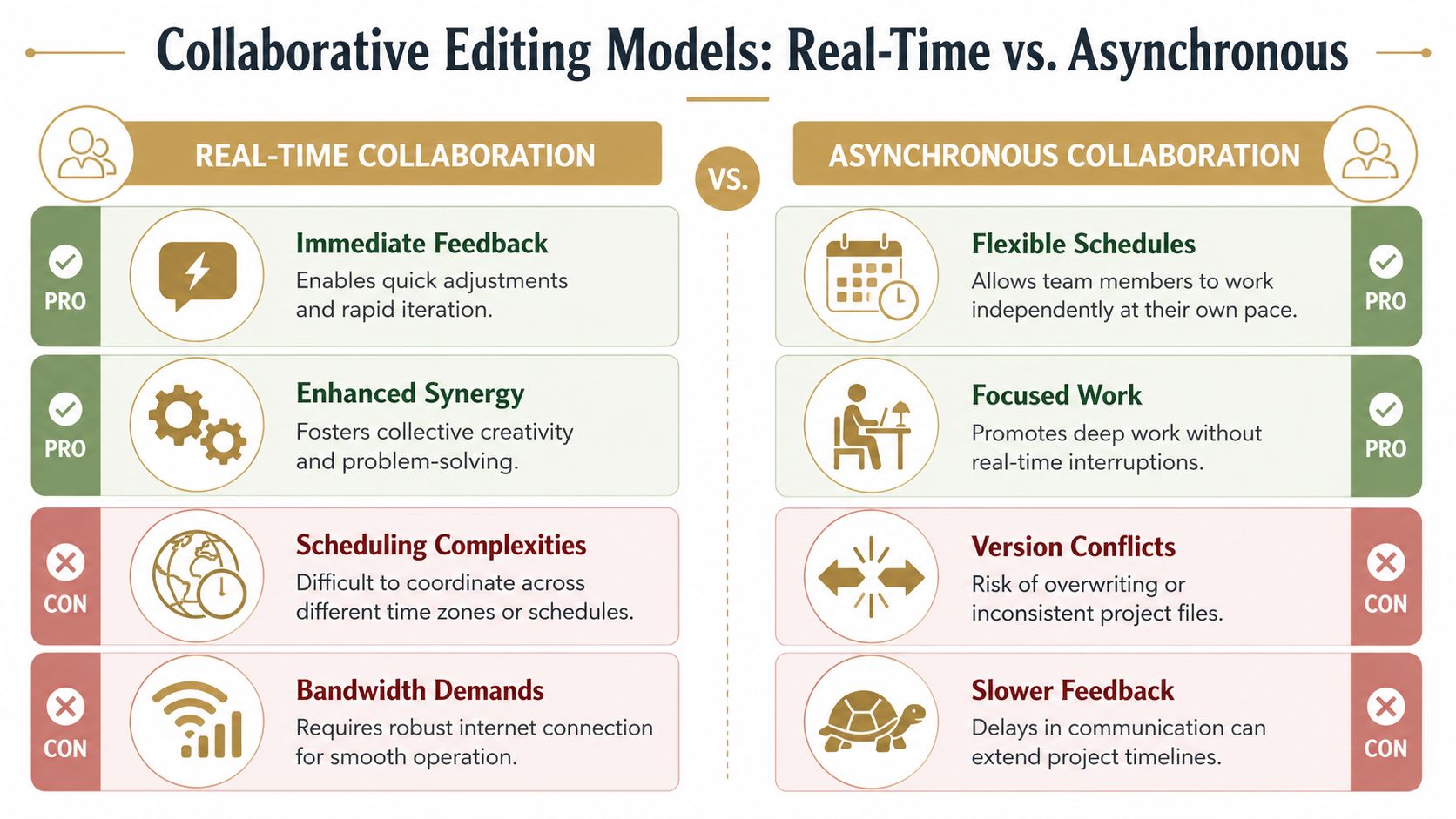
Some teams talk about collaboration as if there’s one ideal method. There isn’t. In practice, you’re choosing between two operating models: real-time collaboration and asynchronous collaboration. The right pick depends on the project, the people, and how much interruption the work can tolerate.
A lot of confusion starts when teams use tools built for one model while expecting behavior from the other.
When real-time collaboration makes sense
Real-time collaborative video editing works best when multiple people need access to the same project state at the same time. That’s useful for fast-turn marketing edits, live campaign changes, news-style production, or specialist teams touching the same sequence in parallel.
Modern systems can support simultaneous multi-user editing while using sync checkpoints or change-push controls so people don’t have to see every tiny intermediate adjustment immediately, as described in this discussion of real-time collaborative editing workflows. That matters because pure visibility can become noise. Editors need awareness, but they also need room to work.
Here’s the embedded example:
Real-time is strongest when:
- Speed matters most: Teams need rapid iteration and short decision loops.
- Specialists overlap: Edit, sound, or finishing work benefits from parallel access.
- Leadership is available: Decision makers can respond quickly enough to keep momentum.
Real-time is weakest when too many people think “being present” means “comment constantly.” That turns collaboration into interruption.
When asynchronous work is the better choice
Asynchronous collaboration is still the better model for a lot of polished work. One person edits. Others review later. Feedback gets consolidated. Revisions happen in defined rounds.
This model protects deep work. It also reduces accidental interference from stakeholders who want visibility but don’t need to shape every in-progress decision.
Asynchronous works best when:
- The cut needs concentration: Brand films, tutorials, explainers, and narrative edits usually benefit from uninterrupted shaping.
- Reviewers are distributed: Teams across time zones can’t stay in lockstep.
- Authority needs structure: Producers need time to filter opinions before handing notes to the editor.
For teams comparing review-heavy tools before they commit to a process, a roundup of Loom alternatives for team communication can help clarify the difference between quick async communication and a true editing workflow.
Real-time editing solves waiting. Asynchronous editing solves interruption.
A simple decision table
| Project condition | Better model | Why |
|---|---|---|
| Tight-turn campaign update | Real-time | Faster decisions and parallel work |
| High-polish brand piece | Asynchronous | Better focus and cleaner approvals |
| Distributed client review | Asynchronous | Easier to control comments and rounds |
| Specialist-heavy finishing pass | Real-time | Parallel access helps if change visibility is controlled |
The mistake isn’t choosing one or the other. The mistake is drifting between both without rules. If the team says a project is asynchronous, don’t let five stakeholders jump into live revision mode. If the team says it’s real-time, define who can push changes and when checkpoints happen. Collaboration only works when the operating model is deliberate.
The Modern Collaborative Video Tool Stack
No single app handles collaborative video editing cleanly from capture to approval. Teams get better results when they build a tool stack, where each layer has one job and the handoffs between layers are intentional.
That matters because the asset that starts the project often determines how much cleanup everyone else inherits.
Creation is a separate layer
For product demos, training videos, onboarding walkthroughs, and feature announcements, creation starts before the NLE. Screen recordings, device captures, voiceover takes, webcam overlays, and narrated walkthroughs are source assets. If those are messy, the edit becomes repair work.
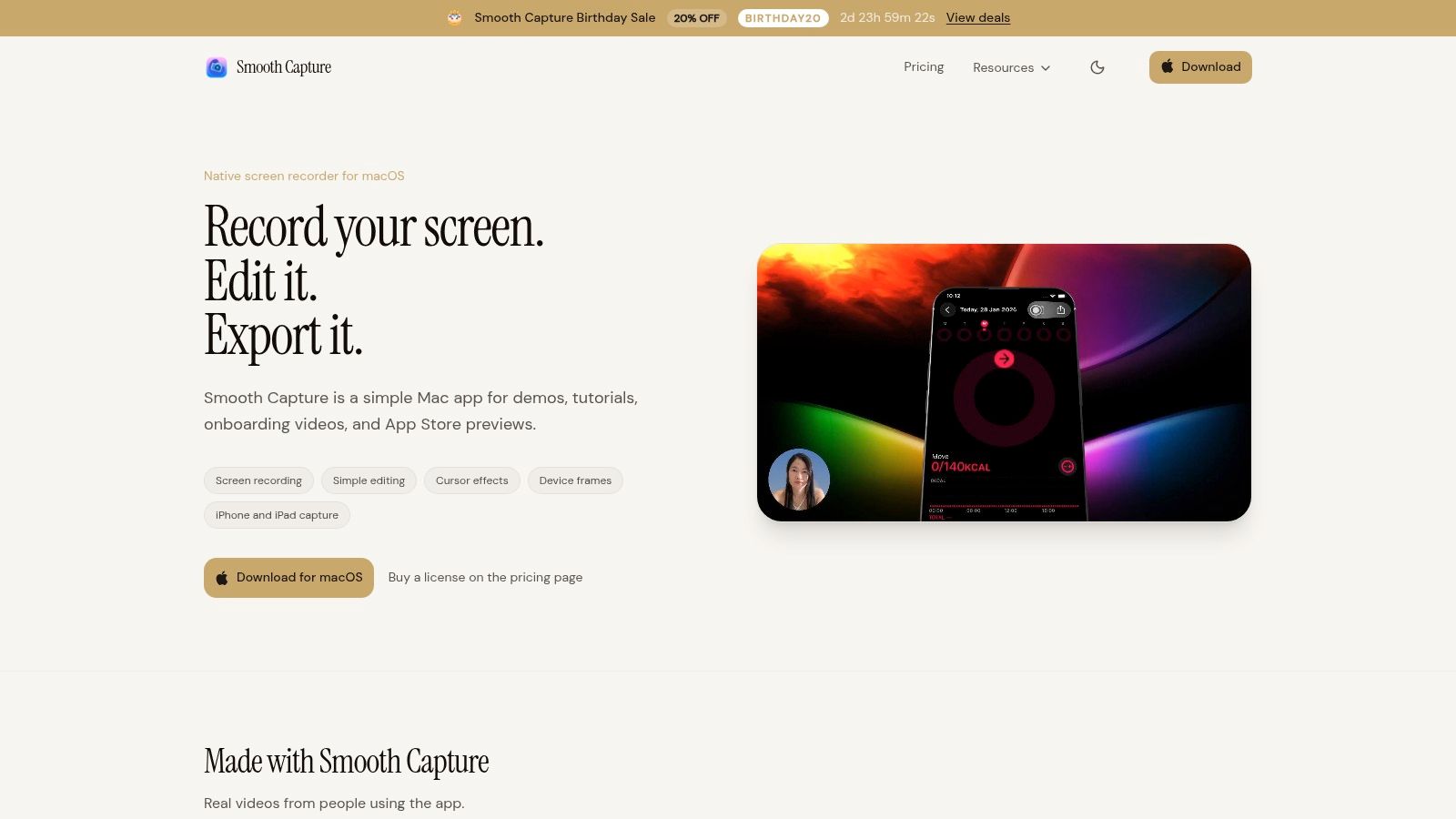
A lot of teams now separate creation tools from editing tools on purpose. They record in one system, organize media centrally, then cut and review elsewhere. That’s healthier than forcing the editor to also solve capture inconsistencies.
If your team is evaluating voice-and-screen workflows against text-driven editing products, Typist’s alternative to Descript is worth reading because it frames the trade-off between transcript-first production and more traditional capture-and-edit pipelines.
Editing storage and review do different jobs
Editors often want one platform to do everything. In practice, three layers matter more than one giant system.
- Editing layer: Premiere Pro, Final Cut Pro, DaVinci Resolve, or another NLE where the actual cut gets built.
- Shared storage layer: The place where the source media, project files, and exports remain available to everyone who should touch them.
- Review layer: The system where producers, clients, and internal stakeholders comment and approve.
LucidLink’s workflow model emphasizes a single shared filespace where updates appear instantly for everyone, and that when one person adds a file, it becomes immediately available to the whole team, which helps eliminate version confusion and transfer delays in distributed collaboration, as described on LucidLink’s collaborative video editing page. That’s a storage and access advantage. It doesn’t replace the need for disciplined review governance, but it does remove a common source of chaos.
The stack that works in practice
A practical stack for many teams looks like this:
| Job | What to use | Operational purpose |
|---|---|---|
| Capture and source creation | Screen recorder, camera, audio tools | Generate clean source material |
| Editing | NLE | Build the sequence and revisions |
| Shared media access | Cloud filespace or shared storage | Preserve one working media base |
| Review and approval | Frame-accurate review platform | Collect comments without email sprawl |
| Project coordination | PM tool or producer-owned tracker | Turn comments into assigned actions |
For Mac-heavy teams building their stack around repeatable editing workflows, a guide to Mac video editing software for teams can help compare where editing apps fit versus where review and storage tools fit.
The operational point is simple. Don’t buy tools based on feature lists alone. Buy for handoffs. Ask:
- Where is the source of truth?
- Who can create or modify versions?
- Where do comments live?
- How does approval become documented?
- What happens when a freelancer or client enters the process?
The strongest stack isn’t the one with the most features. It’s the one that makes the next handoff obvious.
When teams answer those questions early, collaborative video editing stops feeling like a string of app decisions and starts feeling like a system.
Mastering the Review and Approval Loop
Often, teams don’t lose control during editing. They lose control during review. That’s where the project leaves the tight logic of the timeline and enters the much messier world of people, preferences, and partial attention.
The handoff stage is a major challenge in video collaboration, and success depends less on real-time co-editing than on asset governance that prevents version confusion and review bottlenecks as assets move between editors, producers, and clients, as highlighted in this workflow discussion on collaboration breakdowns. That’s the operational center of the whole process.
Set rules before the first review link goes out
If you send a cut without instructions, reviewers will invent their own process. That’s how you get branding notes from legal, script notes from sales, and timing comments from someone who only watched half the video on a phone.
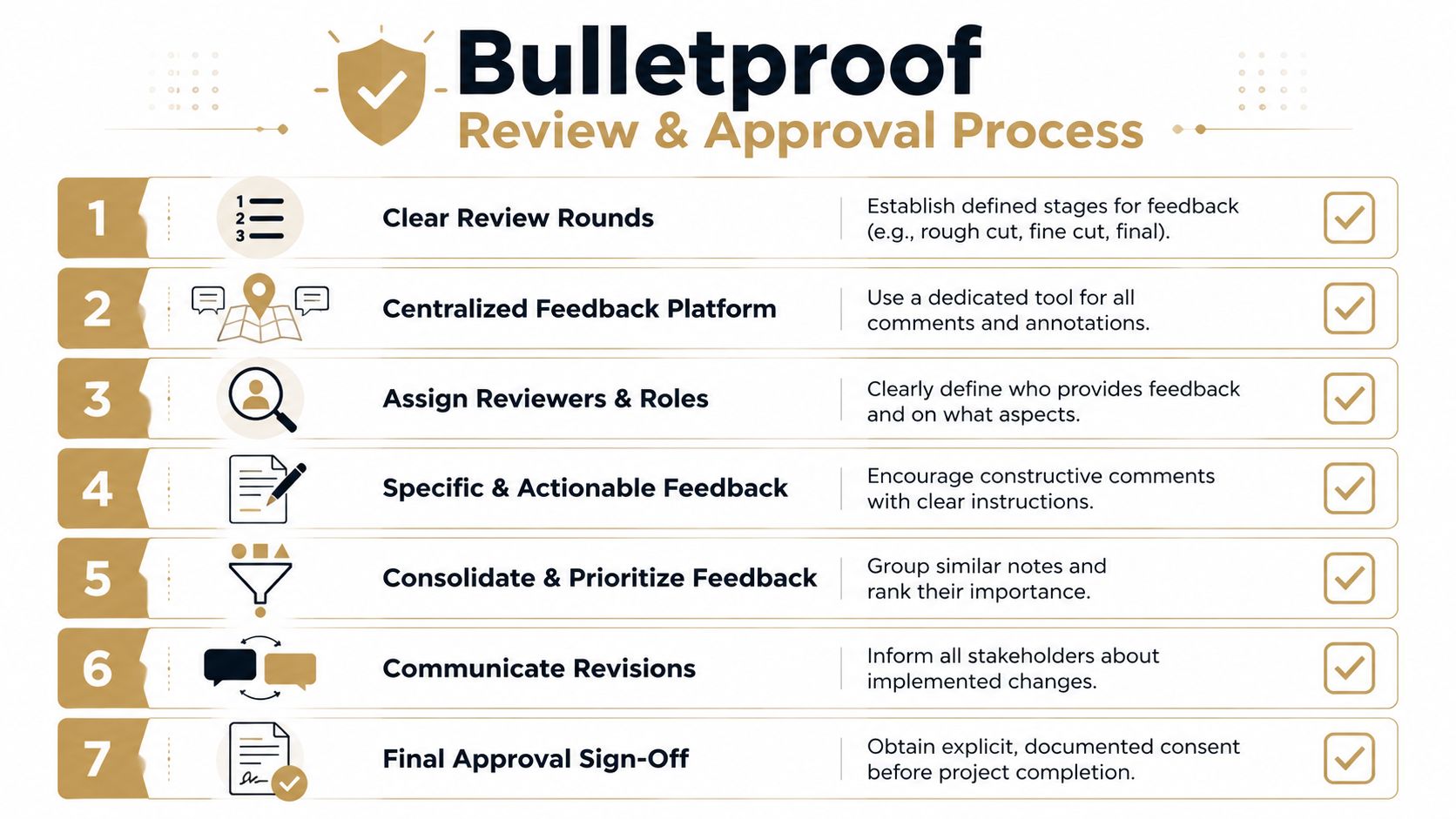
A clean review round needs five things attached to the link:
-
What kind of cut this is
Rough cut, fine cut, near-final, or final approval. Reviewers should know whether they’re judging structure or polish. -
What feedback is in scope
Messaging, pacing, legal, product accuracy, brand, or technical errors. Scope keeps people in their lane. -
Where comments must be left
One platform only. Not email plus chat plus call notes. -
When feedback is due
Not “when you get a chance.” -
Who has decision authority
Reviewers advise. A designated approver decides.
For teams managing approvals across multiple asset types, not just video, PostPlanify’s social media workflow guide is useful because it shows how approval discipline matters just as much as the creative itself.
Turn scattered feedback into one revision brief
Editors should receive one revision brief, not raw stakeholder sprawl.
That means the producer or project owner has to consolidate feedback before it reaches the timeline. If three stakeholders say the intro is too long in different ways, that becomes one note. If two stakeholders disagree, the producer resolves the conflict before sending revisions.
A useful revision brief usually includes:
- Accepted changes: Notes that will be implemented
- Rejected notes: Suggestions declined, with owner approval
- Open decisions: Questions that need a specific answer before editing resumes
- Priority markers: Must-fix, should-fix, nice-to-have
- Version target: The exact next export name and review round
Send editors decisions, not debate.
Frame-accurate comments matter here because they reduce interpretation. “The transition at 00:41 feels abrupt” is actionable. “The middle is weird” is not.
Protect the final approval moment
Final approval fails when teams treat it like a vibe instead of a documented event. “Looks good” in chat isn’t enough if someone later asks why a logo, claim, subtitle, or CTA shipped the way it did.
Use a sign-off rule:
- The producer issues the final review version
- The approver confirms acceptance in the designated system
- The team archives the approved export and related project state
- Any post-approval change creates a new version, not a silent replacement
That last point matters more than people think. Silent replacement is one of the fastest ways to destroy trust in a workflow. If a file changes, the version should change too.
A solid approval loop feels slower for a day and faster for the whole project. It limits confusion, shortens rework, and gives the editor a clean path from notes to next cut without reopening settled decisions.
Your Collaborative Workflow Checklist
The best collaborative video editing system is the one your team can repeat under pressure. Not the fanciest one. Not the one with the longest SOP. The one people consistently follow when a launch date moves up, a stakeholder joins late, or a client asks for one more round.
Project kickoff checklist
- Assign ownership: Name the producer, editor, reviewers, and final approver.
- Choose the working model: Decide whether this project is real-time, asynchronous, or hybrid with strict boundaries.
- Create the file structure: Set folders for admin, raw footage, audio, graphics, project files, exports, and archive.
- Lock naming rules: Agree on sequence and export naming before the first asset lands.
- Define review rounds: Rough cut, fine cut, and approval stages should be explicit.
- Confirm delivery requirements: Aspect ratios, destinations, platform specs, and approval format should be known upfront.
Pre-review checklist
- Export the correct version: Match sequence name and export name.
- Check links and media: Make sure the cut reflects the intended project state.
- State feedback scope: Tell reviewers what kind of comments are needed in this round.
- Set a deadline: Every review round needs a due date.
- Use one comment channel: Don’t split notes across email, chat, and calls.
- Prepare consolidation ownership: One person should translate comments into a revision brief.
Final delivery checklist
- Get explicit sign-off: Approval should be documented, not implied.
- Store the approved master: Save it in the correct delivery and archive locations.
- Preserve the source project state: Keep the project file and associated assets organized for future revisions.
- Label superseded exports clearly: Prevent accidental reuse later.
- Record what shipped: Include version name, date, destination, and approver.
- Archive the working trail: Notes, review links, and revision summaries should stay traceable.
If your team also manages broader creative operations, these project management tactics for content teams are a useful companion because video chaos usually reflects planning chaos elsewhere too.
A good checklist won’t make creative decisions for you. It will keep the project stable enough for good creative decisions to happen.
If your team creates product demos, tutorials, onboarding videos, or launch assets on Mac, SmoothCapture is built for that front end of the workflow. It helps teams produce polished source footage with device frames, cursor effects, subtitles, webcam overlays, and a fast built-in editor, so the collaboration process starts with cleaner assets and fewer avoidable fixes later.
Ready to create stunning app demos?
SmoothCapture makes it easy to record your screen with 3D device frames, cinematic cursor effects, and professional editing tools.